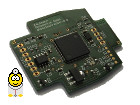
The current CANHack.de CAN Interface Hardware is the RKS+CAN from Kaufmann Automotive GmbH. It is a CAN to USB diagnostic interface with a dongle function.
This topic is only relevant if you want to develop your own programs for the RKS+CAN or if it is to be used for already existing programs.
It offers a ASCII compatibility interface (LAWICEL compatible) as well as a Windows .dll to interface with existing software (Windows, Linux, Mac).
As a new development, it supports WCID (Windows Compatible ID), which means that it can be directly accessed by applications developed for current operating systems such as Microsoft Windows Vista, 7, 8, 8.1, 10, and 11, without the need to worry about driver issues.
The hardware used has an integrated license management system and offers significant reserves for future feature enhancements; the firmware of the CAN interface is upgradeable.
For larger quantities, branding is possible. A wireless WIFI version is in the planning stages.
Software package customizable; the following software is included by default:
- KCANMonitor CAN bus sniffer.
- CAN-API for C++ and further examples (VB.NET, etc.).
- OBD2 software, such as KOBD2Check, which means the system can also be used for reading OBD2 error codes.
- Visualize and analyze OBD2 data with KDataScope.
Das RKS+CAN CAN-Interface stellt 2 Schnittstellen zur Verfügung, VCP (virtueller COM Port für Linux und Macs, Windows XP - 8.1) und WinUSB (Linux, Macs, Windowx XP - 8.1).
Treiberinstallation Windows: Wird vollautomatisch mit dem RKS+CAN Installationspaket erledigt. Ab Windows 8 durch WCID keine manuelle Treiberinstallation notwedig.
Bei Linux folgende Zeile zur Datei /etc/modules hinzufügen:
usbserial vendor=0x16d0 product=0x0870
Das Gerät steht dann als /dev/ttyUSB0 zur Verfügung.
Bei Kubuntu 18.04 musste ich allerdings folgendes machen:
insmod /lib/modules/4.15.0-210-generic/kernel/drivers/usb/serial/usbserial.ko vendor=0x16d0 product=0x0870
Info zum Treiber gibt es mit: modinfo usbserial
Update für fedora 37 und Ubuntu 22.03 LTS:
verwendbar mit Treiber usb-serial-simple.
RKS+CAN-VCP.png
Description:
Virtueller COM Port, Treiber installieren (Windows XP - 8.1).
File size:
316.82 KB
Viewed:
20089 times
VCP-Port-Config.png
Description:
Einstellung der Ports beim VCP (Windows XP - 8.1).
RKS+CAN Windows Interface DLL zur Nutzung der WinUSB Schnittstelle in eigenen Programmen.
Versionshistorie:
- 11.01.2014: Erstes Release
- 21.01.2014: Bugfixes sichere Initialisierung und Hardware Zeitstempel Modus.
- 23.01.2014: Bugfix, keine CAN Nachrichten mehr nach kurzer Trennung vom Bus.
- 24.01.2014: Feature Ub Spannungsmessung am OBD2 Stecker.
- 01.02.2014: Bugfix, Bitratenselektion < 83.333Bit/s.
- 29.06.2014: Bugfix, senden von Nachrichten.
- 03.07.2014: Bugfix, Behandlung von Ausnahmefehlern.
- 08.07.2014: Update, Dokumentation in RKS-USB.H
- 08.07.2014: Bugfix, beenden Benutzung der DLL.
- 04.12.2014: Feature Hardware CAN Filter konfigurierbar.
- 10.12.2014: Feature RTR Nachrichten.
- 27.04.2018: Asynchrone Verarbeitung von Befehlen, auch bei offenem CAN Bus und eintreffenden Nachrichten. D.h. während man CAN Nachrichten liest, kann z.B. die Spannung am OBD2 Stecker abgefragt werden.
API-Beschreibung:
Code:
// RKS-USB.h : main header file for the RKS-USB DLL
//
#pragma once
#ifndef __AFXWIN_H__
#error "include 'stdafx.h' before including this file for PCH"
#endif
// CAN data structure
typedef struct
{
DWORD dwID;
BYTE byDLC;
BYTE abyData[8]; // max 8 data bytes
} can_data_t;
// CAN error information structure
typedef struct
{
BYTE byError;
} can_err_t;
// CAN information structure
typedef union
{
can_data_t sData;
can_err_t sErr;
} can_union_t;
// The final CAN frame structure used for send/receive
typedef struct
{
BYTE byType;
DWORD dwTimeStamp;
can_union_t uFrm;
} can_msg_t;
// DLL exports
// Initialize USB driver, open connection to RKS+CAN hardware. Returns TRUE on success.
// This command must be done once before calling any other RKS... function, except
// RKSDeviceConnected.
extern "C" __declspec(dllexport) BOOL RKSInitialize(void);
// Free USB driver and RKS+CAN hardware. Should be called to release interface/driver.
extern "C" __declspec(dllexport) void RKSFree(void);
// Check if the RKS+CAN is connected to the computer. Returns TRUE on success. pcBufIfGUID can be NULL.
// If pcBufIfGUID is not NULL, copy the DeviceInterfaceGUID of the RKS+CAN hardware to it.
// If you check simply if the RKS+CAN is connected, it is recommended to call it with pcBufIfGUID = NULL.
extern "C" __declspec(dllexport) BOOL RKSDeviceConnected(LPSTR pcBufIfGUID, DWORD dwBufSize);
// Set the timeouts for reading / writing data to the RKS+CAN interface. The software waits at maximum the
// specified values for read/write operations to complete. Returns TRUE on success.
extern "C" __declspec(dllexport) BOOL RKSSetTimeouts(DWORD dwMsTimeoutRead, DWORD dwMsTimeoutWrite);
// Get the version of the of the RKS+CAN hardware. Returns TRUE on success.
extern "C" __declspec(dllexport) BOOL RKSGetVersion(PUCHAR pucBuffer, DWORD dwBufferLength);
// Get the serial number of the RKS+CAN hardware (printed on the cable case). Returns TRUE on success.
extern "C" __declspec(dllexport) BOOL RKSGetSerial(PUCHAR pucBuffer, DWORD dwBufferLength);
// Return time since RKS-USB driver initialisation. bReInit can be used to reset the time to zero.
// Can be used to get relatively exact time information, the time is returned in seconds.
extern "C" __declspec(dllexport) double RKSGetTimeSinceInit(BOOL bReInit = FALSE);
// Get the error status of the RKS+CAN interface in pbyStatus. Returns TRUE on success.
extern "C" __declspec(dllexport) BOOL RKSCANGetLastStatus(BYTE* pbyStatus);
// Set RKS+CAN hardware to listen only mode. Returns TRUE on success.
extern "C" __declspec(dllexport) BOOL RKSCANSetListenOnly(BOOL bEnabled);
// Set time stamp mode of the RKS+CAN hardware. E.g. 0, 1 or 2.
// For possible values check the ASCII interface description. Returns TRUE on success.
extern "C" __declspec(dllexport) BOOL RKSCANSetTimeStamp(BYTE byMode);
// Get time stamp mode. Returns TRUE on success.
extern "C" __declspec(dllexport) BOOL RKSCANGetTimeStamp(BYTE*pbyMode);
// Get the supply voltage of the RKS+CAN hardware. Returns TRUE on success.
extern "C" __declspec(dllexport) BOOL RKSCANGetUb(DWORD* pdwVoltage_mV);
// Set CAN hardware filtering of the RKS+CAN hardware. Returns TRUE on success.
extern "C" __declspec(dllexport) BOOL RKSCANSetFilter(DWORD dwCode, DWORD dwMask);
// Open CAN bus with the desired bitrate. Returns TRUE on success.
extern "C" __declspec(dllexport) BOOL RKSCANOpen(DWORD dwBitrate);
// Close CAN bus. Returns TRUE on success.
extern "C" __declspec(dllexport) BOOL RKSCANClose(void);
// Get one CAN message from the receive queue, RKSCANOpen(...) must have
// been called before. Returns TRUE on success.
extern "C" __declspec(dllexport) BOOL RKSCANRx(can_msg_t* pMsg);
// Add one CAN message to the send queue, RKSCANOpen(...) must have
// been called before. Returns TRUE on success.
extern "C" __declspec(dllexport) BOOL RKSCANTx(can_msg_t* pMsg);
RKS-USB.rar
Description:
RKS-USB.DLL, RKS-USB.H, RKS-USB.LIB, RKS-USB.EXP
DLL-Schnittstelle für die RKS+CAN Hardware in eigenen Anwendungen.
I take the chance and recommend our CAN-interface RKS+CAN in english. It has the
following advantages:
- NO problems with USB 2.0 nor USB 3.0 hosts
- NO (!!!) driver hassling, once plugged to the computer, Windows
installs (if needed) automatically the necessary driver. The user or a
software developer using our cable needs to to *nothing*. (Win > XP)
- Compatible to Win XP - Win 10
- Firmware (commands) can be adapted to YOUR need as software developer.
- Currently it is tested out and working perfectly. If later firmware
updates may be necessary, this is absolutely NO problem. The encrypted
firmware can be simply delivered with your latest software package.
Updating the firmware is one line of code.
- Secure license handling, an application can check for valid license
using asymmetric encryption via elliptic curves (curve25519). Even we as
hardware developer do not know what license is stored in the cable!
- You can identify single cables using the cable serial number that you
wish to print on your cable OR using the microcontroller's internal
serial number.
- Fast microcontroller that is not easy to copy/clone/read out: LPC1756.
- Demo code (C++) for license check/store/firmware upgrade/CAN
communication available.
- You can use your own USB VID/PID or use one of ours (exclusively for
YOUR cable version).
- Competitive price, WE are the manufacturer. Just tell us your
quantities and wishes what to change to your needs.
Linux:
Vendor/Device-ID für Treiber usb-serial-simple erfolgreich getestet
Code:
[ 8061.025594] usbserial: USB Serial support registered for kaufmann
[ 8061.025611] usb_serial_simple 2-1.3:1.0: kaufmann converter detected
[ 8061.031722] usb 2-1.3: kaufmann converter now attached to ttyUSB0
[ 8061.031767] usb_serial_simple 2-1.3:1.1: kaufmann converter detected
[ 8061.031871] usb 2-1.3: kaufmann converter now attached to ttyUSB1
Sollte, warum auch immer usb-serial-simple bei angestecktem Interface nicht mit "lsmod" gelistet sein, "insmod usbserial" und dann "insmod usb-serial-simple".


 Bookmarks
 Garage
 FAQ, Legal Notice & Privacy
 RSS Feed
 Register
 Login
Login