| Author |
Message |
AudiA4B6US
Guest
Free account, no CAN development support
|
 20-03-2006, 16:46 Subject: TV Free for PC: RNS-E Compatibility |
Quote |
|
Shall we start?
I would like to connect a PC to the video input of the Audi Navigation Plus RNS-E. I am currently looking for a working graphics card that can also properly control the RGB input. However, the problem will then arise that the video input is disabled above 5 km/h, which makes using the PC somewhat difficult. In VAG-COM, there is a function called 'Security Access' whose code I have now found. However, I don't know how to activate the unlocking function after that.
If anyone else is interested in this topic, maybe we can exchange information. Since I live in the USA, there might be differences between the European and North American versions of the RNS-E software, but that just makes it more interesting.
Regards,
Dirk.
Translated on 09-10-2026, 1:34.
|
|
| Back to top |
|
 |
cardoc
Guest
Free account, no CAN development support
|
| 21-03-2006, 22:04 Subject: TV Free for PC: RNS-E Compatibility |
Quote |
|
Hi, I just bought an A3 8P and I want to install an RNS E and then integrate my car PC from my old car into it. I know that there's a hardware module to unlock it, which changes or blocks the CAN bus speed. However, I suspect that it might also be possible to disable it through software. Therefore, I'm also interested in knowing more about that.
Translated on 09-10-2026, 1:35.
|
|
| Back to top |
|
|
AudiA4B6US
Guest
Free account, no CAN development support
|
| 21-03-2006, 22:09 Subject: TV Free for PC: RNS-E Compatibility |
Quote |
|
The hardware modules I've seen so far all have the disadvantage that the speed signal is completely filtered out, which makes the navigation very inaccurate. If there were a module that didn't have this drawback, that would be an acceptable option. Otherwise, there are several providers in Germany that unlock the RNS-E via OBD/VAG-COM. So, it is possible, the question is just how...
Translated on 09-10-2026, 1:36.
|
|
| Back to top |
|
|
AudiA4B6US
Guest
Free account, no CAN development support
|
| 21-03-2006, 22:21 Subject: TV Free for PC: RNS-E Compatibility |
Quote |
|
GPS-based navigation systems are designed to determine the position solely through GPS, and therefore query the GPS data much more frequently. If the RNS-E does not receive a speed signal, it becomes very inaccurate, and the position is only updated every 1-5 minutes. Therefore, it's not a real solution.
'When the speed signal is present, the pointer on the navigation device moves approximately every 1-2 seconds, regardless of how fast you are driving. If the signal is absent, it is updated much less frequently, roughly every 1-5 minutes, and this is independent of the speed.'
Translated on 09-10-2026, 1:37.
|
|
| Back to top |
|
|
cardoc
Guest
Free account, no CAN development support
|
| 22-03-2006, 10:11 Subject: TV Free for PC: RNS-E Compatibility |
Quote |
|
The speed signal should be re-enabled when using the auto-navigation feature. This should prevent any issues with the original navigation system. However, once this is activated and running in the background, it should be possible to connect a PC and use navigation software with a separate GPS mouse. These programs are now almost as good, if not better, than the built-in navigation systems.
Translated on 09-10-2026, 1:38.
|
|
| Back to top |
|
|
arthurik
Guest
Free account, no CAN development support
|
| 04-04-2006, 15:38 Subject: TV Free for PC: RNS-E Compatibility |
Quote |
|
Okay, so I retrofitted the RNS-E system in my A3 8L. Initially, I didn't connect the speed signal. The navigation system took a little while to get started, but then it updated the position using GPS, and the update frequency was about every 1-2 seconds, just like it would have been with the speed signal connected.
Now I've also got the speed signal working, and I've already encoded the wheel size. The only thing I've noticed is that before, when using GPS, the navigation system would sometimes jump between two streets that were very close together. Now, it doesn't do that anymore.
Translated on 09-10-2026, 1:39.
|
|
| Back to top |
|
|
MiniDisc
Guest
Free account, no CAN development support
|
| 28-08-2006, 14:39 Subject: TV Free for PC: RNS-E Compatibility |
Quote |
|
As far as I know, there are only two ways to bypass the TV speed limit (5 km/h) in a car. Either you can trick the navigation system into thinking you're not moving, which has the disadvantage of poor or no navigation, or you can unlock the navigation system by increasing the speed limit (the default is 5 km/h). Unfortunately, if you do this through the diagnostic interface, you need a login code, which no one will provide. This would allow anyone to unlock it themselves. Alternatively, there are companies online that offer this unlocking service. I found one company on their website that offers it for €100. The device that tricks the system is also not cheaper, and unlocking via the diagnostic interface has no disadvantages for navigation.
Translated on 09-10-2026, 1:40.
|
|
| Back to top |
|
|
AudiA4B6US
Guest
Free account, no CAN development support
|
| 28-08-2006, 15:20 Subject: TV Free for PC: RNS-E Compatibility |
Quote |
|
'If anyone knows more about this, I've managed to find the security access code for the Euro 0100 software through trial and error. This should also work for other software versions, but it may take up to three weeks. This is the only number that VAG-COM accepts in this field. Unfortunately, it doesn't allow setting channel 005 to 255. So, there are probably other prerequisites that I'm not yet aware of.'
If anyone has had their device unlocked and owns a VAG-COM, I would be happy to contribute to the unlocking costs if they could provide me with some details about their unlocked device. This way, we could figure out how the unlocking process works. For example, I would be interested in a complete listing of all the values of the channels in control module 37/56, so that we can compare what has been changed.
Translated on 09-10-2026, 1:42.
|
|
| Back to top |
|
|
arthurik
Guest
Free account, no CAN development support
|
| 29-08-2006, 19:27 Subject: TV Free for PC: RNS-E Compatibility |
Quote |
|
I don't think you can do much with the channels. It would be more interesting to have the EEPROM content of an unlocked navigation system. So, read the EEPROM, then unlock it, read the EEPROM again, and compare the two dumps. If the value in channel 5 has to be 255, then you will have to change a value somewhere to FF. However, I haven't had a chance to read out the navigation system yet. I also don't know which EEPROM is used in the RNS-E. But I don't think it will be a problem; it's not the first device I've read out (just the first navigation system).
'Has anyone perhaps disassembled the navigation system before and can tell me which type of EEPROM is used?'
Translated on 09-10-2026, 1:44.
|
|
| Back to top |
|
|
AudiA4B6US
Guest
Free account, no CAN development support
|
| 29-08-2006, 22:50 Subject: TV Free for PC: RNS-E Compatibility |
Quote |
|
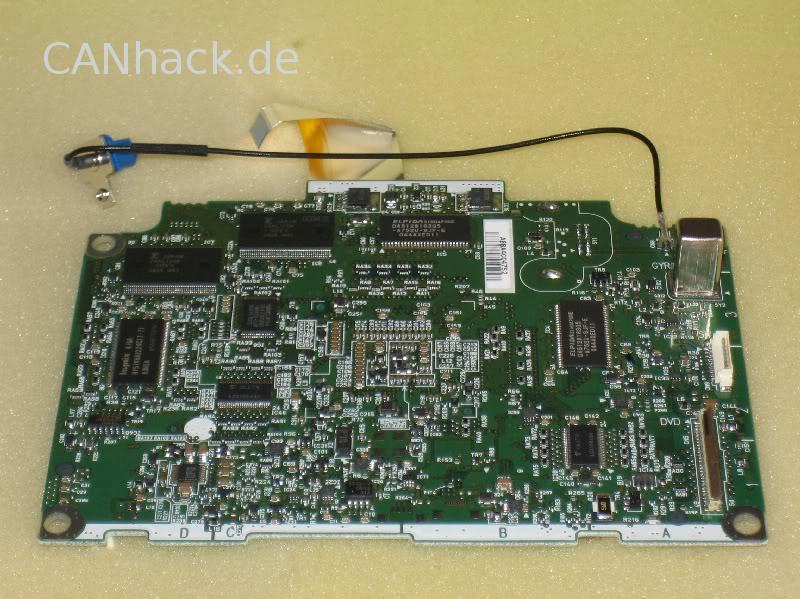
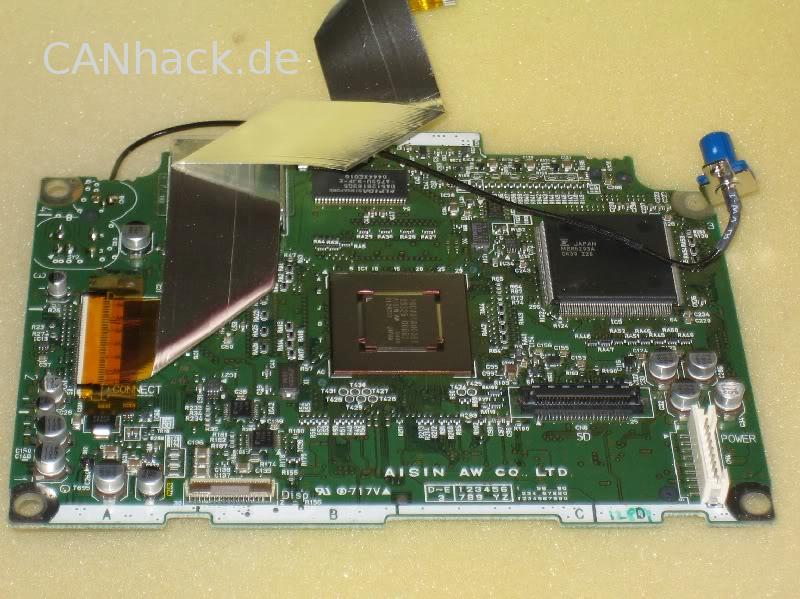
Tell me what the EEPROM might be, and I'll tell you what's written on it:
| Description: |
| TV Free for PC: RNS-E Compatibility |
|
| File size: |
126.14 KB |
| Viewed: |
3090 times |
|
| Description: |
| TV Free for PC: RNS-E Compatibility |
|
| File size: |
117.72 KB |
| Viewed: |
993 times |
|
Translated on 09-10-2026, 1:44.
|
|
| Back to top |
|
|
arthurik
Guest
Free account, no CAN development support
|
| 30-08-2006, 8:55 Subject: TV Free for PC: RNS-E Compatibility |
Quote |
|
I sent you the link to the images via private message. I couldn't find a quick way to upload the images here.
What I suspected, I have marked.
Translated on 09-10-2026, 1:45.
|
|
| Back to top |
|
|
AudiA4B6US
Guest
Free account, no CAN development support
|
| 01-09-2006, 21:24 Subject: TV Free for PC: RNS-E Compatibility |
Quote |
|
The chip on the top side, labeled C1, is marked as follows:
3793-7
0505
344
On the bottom side, in cell C4:
LVDS1
4 AM.
C9E7
The two connectors described in section B2 are 14-pin and are labeled as follows:
VHC
T04A
507
and
VHC
T08A
505
Regards,
Dirk.
Translated on 09-10-2026, 1:46.
|
|
| Back to top |
|
|
arthurik
Guest
Free account, no CAN development support
|
| 03-09-2006, 21:04 Subject: TV Free for PC: RNS-E Compatibility |
Quote |
|
Okay, so none of the mentioned components are EEPROMs. But I've now opened up the navigation device. On the back of the device, there's a circuit board. On that board is the EEPROM, specifically the 9346. I'm going to try to read its contents. I'll let you know if I find out anything more.
Translated on 09-10-2026, 1:47.
|
|
| Back to top |
|
|
arthurik
Guest
Free account, no CAN development support
|
| 10-09-2006, 9:13 Subject: TV Free for PC: RNS-E Compatibility |
Quote |
|
Unfortunately, I haven't had any success while trying to read the data  .
'First, I got my hopes up too soon. The designation 9346 unfortunately doesn't refer to the 93c46 EEPROM. I then disassembled my navigation system further and found the 24c16 EEPROM. Reading the data from it hasn't worked flawlessly so far. I'm also not sure if there's anything useful on it, as I found the names of the radio stations there.'
Translated on 09-10-2026, 1:48.
|
|
| Back to top |
|
|
NeVeRmInD
Guest
Free account, no CAN development support
|
| 16-11-2006, 11:55 Subject: TV Free for PC: RNS-E Compatibility |
Quote |
|
If someone has had their device unlocked and owns a VAG-COM, I would be happy to contribute to the unlocking costs if that person could provide me with some details about their unlocked device, so we can figure out how the unlocking process works. For example, I would be interested in a complete listing of all the values of the channels in control module 37/56 to compare what has been changed.
Hi,
I've also been able to access it for a while now, since it was unlocked via software.
I'm interested. I think your idea is really great!
The prices for unlocking devices are also decreasing. Previously, they were around 250 euros, but now, in my area (Stuttgart), they are around 70-80 euros.
Who besides me would participate in such an action??
If we have enough people, it's worth trying, even if it's just for a few euros, right  ? We can figure out how to unlock/access someone's navigation system later.
Regards,
Christoph.
Translated on 09-10-2026, 1:50.
|
|
| Back to top |
|
|
MiniDisc
Guest
Free account, no CAN development support
|
| 25-11-2006, 17:40 Subject: TV Free for PC: RNS-E Compatibility |
Quote |
|
Hello everyone, I will definitely have my RNS-E unlocked for my A6 within the next month. I don't think reading the data from control units 37/56 will reveal anything new. It would be more important to document the unlocking process.
Best regards, MiniDisc.
Translated on 09-10-2026, 1:52.
|
|
| Back to top |
|
|
|


 Bookmarks
 Garage
 FAQ, Legal Notice & Privacy
 RSS Feed
 Register
 Login

